iPhone チャンネルで iOS5 で 設定画面を一発で開ける アイコンの作成方法についてまとまってます。
iOS5でWi-Fiなどの設定画面を一発で開けるアイコンを作れることが判明 : iPhoneちゃんねる:
設定画面に入って、メニューを辿って行くことを考えると
よく使うものは アイコンをつくっておくと便利でしょう。
2011年11月11日金曜日


Windows で巨大なサイズのファイルを作る時の方法
仕事で 検証用に 巨大なファイルが必要になるときがたまにあります。
どういう時か っていうと ディスクフル になった時の検証を行ったり、
あるファイルのサイズが 指定サイズを超えた時にどうなるかを検証したりする時なんですが、
VBスクリプトで 沢山書き出してもいいのですが、
結構時間がかかったりします。
そういうときに fsutil コマンドを使うと簡単に 指定したサイズのファイルを作ることが出来ます。
このコマンドでつくったファイルの中身は ゼロ で埋められています。
0x00 です、なのでメモ帳で開いたりすると 何もなにもないように見えます。
どういう時か っていうと ディスクフル になった時の検証を行ったり、
あるファイルのサイズが 指定サイズを超えた時にどうなるかを検証したりする時なんですが、
VBスクリプトで 沢山書き出してもいいのですが、
結構時間がかかったりします。
そういうときに fsutil コマンドを使うと簡単に 指定したサイズのファイルを作ることが出来ます。
fsutil file createnew ファイル名 サイズと指定して実行します。
このコマンドでつくったファイルの中身は ゼロ で埋められています。
0x00 です、なのでメモ帳で開いたりすると 何もなにもないように見えます。
2011年11月8日火曜日
MacBookの外付けHDDを USB2.0のHDDから FW800 のHDD(Lacie LCH-2D1TQ)に交換
前のMacBookの時に Firewireが付いてなかったので、
USB2.0のハードディスクを外付けのデータ用ディスクとして使っていて、
MacBook pro になってもそのまま 使っていたのですが、
せっかく FW800が付いているのにもったいないのと
外付けHDDに入れている 仮想マシン達が 若干 引っかかるような動作になるので
FW800のHDDに入れ替えを行いました。
HDD自体は 前から持っていて Windows で使っていた、
Lacie の LCH-2D1TQ という 1TBのハードディスクです。
今 タイの洪水の影響で バルクのHDDの値段が上がっておりますが、
まだ このHDDは FWついているのに 1万2000円弱で買えます。
今 タイの洪水の影響で バルクのHDDの値段が上がっておりますが、
まだ このHDDは FWついているのに 1万2000円弱で買えます。
USB2.0, eSATA

入れ替えた 体感速度としては かなり改善されて 正直驚きました。
たいして変わらないと思っていたのですが、体感速度としてはかなり改善しました。
引っかかるような 感じもかなり減りました。
ベンチマークもXbench にて取ってみました。
まず もとのUSBのハードディスク
Results 43.40 System Info Xbench Version 1.3
System Version 10.7.2 (11C74)
Physical RAM 8192 MB
Model MacBookPro8,1
Drive Type SAMSUNG HD203WI
Disk Test 43.40 Sequential 46.12 Uncached Write 53.85 33.06 MB/sec [4K blocks]
Uncached Write 48.59 27.49 MB/sec [256K blocks]
Uncached Read 30.74 9.00 MB/sec [4K blocks]
Uncached Read 66.43 33.39 MB/sec [256K blocks]
Random 40.98 Uncached Write 17.20 1.82 MB/sec [4K blocks]
Uncached Write 91.23 29.21 MB/sec [256K blocks]
Uncached Read 52.40 0.37 MB/sec [4K blocks]
Uncached Read 106.28 19.72 MB/sec [256K blocks]
次に FW 800 接続の LCH-2D1TQ
Results 68.79 System Info Xbench Version 1.3
System Version 10.7.2 (11C74)
Physical RAM 8192 MB
Model MacBookPro8,1
Drive Type LaCie d2 quadra
Disk Test 68.79 Sequential 98.67 Uncached Write 143.89 88.35 MB/sec [4K blocks]
Uncached Write 117.78 66.64 MB/sec [256K blocks]
Uncached Read 53.58 15.68 MB/sec [4K blocks]
Uncached Read 155.41 78.11 MB/sec [256K blocks]
Random 52.80 Uncached Write 18.24 1.93 MB/sec [4K blocks]
Uncached Write 175.18 56.08 MB/sec [256K blocks]
Uncached Read 109.99 0.78 MB/sec [4K blocks]
Uncached Read 163.12 30.27 MB/sec [256K blocks]
シーケンシャルは 倍ぐらいのスピードです。
段々 FWのHDDも減ってきてますが、体感パフォーマンスは USBよりも上だと思いました。
段々 FWのHDDも減ってきてますが、体感パフォーマンスは USBよりも上だと思いました。
2011年11月5日土曜日
macbook air に mysql をインストール
MacBook Air に テスト用の mysql を homebrew を使ってインストールしました。
Homebrew は macports より最近人気のある、*NIX系のアプリをインストールするのに便利な フレームワークです。
公式サイト: http://mxcl.github.com/homebrew/
Homebrew のインストールには 公式サイトに記載がありますが、
を実行するだけで 簡単にインストールされます。
Homebrew がインストールされた後は
mysql をインストールしてみます。
すごく簡単にインストールされました。
今回は 実施しませんが、
起動時に mysql も一緒に起動させるには
mkdir -p ~/Library/LaunchAgents
cp /usr/local/Cellar/mysql/5.5.15/com.mysql.mysqld.plist ~/Library/LaunchAgents/
launchctl load -w ~/Library/LaunchAgents/com.mysql.mysqld.plist
と実行します。
Homebrew は macports より最近人気のある、*NIX系のアプリをインストールするのに便利な フレームワークです。
公式サイト: http://mxcl.github.com/homebrew/
Homebrew のインストールには 公式サイトに記載がありますが、
/usr/bin/ruby -e "$(curl -fsSL https://raw.github.com/gist/323731)"
を実行するだけで 簡単にインストールされます。
Homebrew がインストールされた後は
mysql をインストールしてみます。
$ brew install mysql約8分でインストール完了です。
==> Installing mysql dependency: cmake
==> Downloading https://downloads.sf.net/project/machomebrew/Bottles/cmake-2.8.6
######################################################################## 100.0%
==> Pouring cmake-2.8.6.bottle.tar.gz
/usr/local/Library/Homebrew/download_strategy.rb:114: warning: conflicting chdir during another chdir block
Warning: m4 macros were installed to "share/aclocal".
Homebrew does not append "/usr/local/share/aclocal"
to "/usr/share/aclocal/dirlist". If an autoconf script you use
requires these m4 macros, you'll need to add this path manually.
==> Summary
/usr/local/Cellar/cmake/2.8.6: 628 files, 28M
==> Installing mysql dependency: readline
==> Downloading http://ftpmirror.gnu.org/readline/readline-6.2.tar.gz
######################################################################## 100.0%
==> Downloading patches
######################################################################## 100.0%
==> Patching
patching file vi_mode.c
patching file callback.c
==> ./configure --prefix=/usr/local/Cellar/readline/6.2.1 --mandir=/usr/local/Ce
==> make install
==> Caveats
This formula is keg-only, so it was not symlinked into /usr/local.
OS X provides the BSD libedit library, which shadows libreadline.
In order to prevent conflicts when programs look for libreadline we are
defaulting this GNU Readline installation to keg-only.
Generally there are no consequences of this for you.
If you build your own software and it requires this formula, you'll need
to add its lib & include paths to your build variables:
LDFLAGS -L/usr/local/Cellar/readline/6.2.1/lib
CPPFLAGS -I/usr/local/Cellar/readline/6.2.1/include
==> Summary
/usr/local/Cellar/readline/6.2.1: 28 files, 1.6M, built in 24 seconds
==> Installing mysql dependency: pidof
==> Downloading http://www.nightproductions.net/downloads/pidof_source.tar.gz
######################################################################## 100.0%
==> make all
==> /usr/bin/gzip pidof.1
/usr/local/Cellar/pidof/0.1.4: 2 files, 20K, built in 2 seconds
==> Installing mysql
==> Downloading http://downloads.mysql.com/archives/mysql-5.5/mysql-5.5.15.tar.g
######################################################################## 100.0%
==> Patching
patching file scripts/mysqld_safe.sh
Hunk #1 succeeded at 555 (offset 172 lines).
patching file scripts/mysql_config.sh
Hunk #1 succeeded at 137 (offset 5 lines).
patching file configure.cmake
==> cmake . -DCMAKE_INSTALL_PREFIX=/usr/local/Cellar/mysql/5.5.15 -DMYSQL_DATADI
==> make
==> make install
==> Caveats
Set up databases to run AS YOUR USER ACCOUNT with:
unset TMPDIR
mysql_install_db --verbose --user=`whoami` --basedir="$(brew --prefix mysql)" --datadir=/usr/local/var/mysql --tmpdir=/tmp
To set up base tables in another folder, or use a different user to run
mysqld, view the help for mysqld_install_db:
mysql_install_db --help
and view the MySQL documentation:
* http://dev.mysql.com/doc/refman/5.5/en/mysql-install-db.html
* http://dev.mysql.com/doc/refman/5.5/en/default-privileges.html
To run as, for instance, user "mysql", you may need to `sudo`:
sudo mysql_install_db ...options...
Start mysqld manually with:
mysql.server start
Note: if this fails, you probably forgot to run the first two steps up above
A "/etc/my.cnf" from another install may interfere with a Homebrew-built
server starting up correctly.
To connect:
mysql -uroot
To launch on startup:
* if this is your first install:
mkdir -p ~/Library/LaunchAgents
cp /usr/local/Cellar/mysql/5.5.15/com.mysql.mysqld.plist ~/Library/LaunchAgents/
launchctl load -w ~/Library/LaunchAgents/com.mysql.mysqld.plist
* if this is an upgrade and you already have the com.mysql.mysqld.plist loaded:
launchctl unload -w ~/Library/LaunchAgents/com.mysql.mysqld.plist
cp /usr/local/Cellar/mysql/5.5.15/com.mysql.mysqld.plist ~/Library/LaunchAgents/
launchctl load -w ~/Library/LaunchAgents/com.mysql.mysqld.plist
You may also need to edit the plist to use the correct "UserName".
Warning: m4 macros were installed to "share/aclocal".
Homebrew does not append "/usr/local/share/aclocal"
to "/usr/share/aclocal/dirlist". If an autoconf script you use
requires these m4 macros, you'll need to add this path manually.
==> Summary
/usr/local/Cellar/mysql/5.5.15: 6276 files, 217M, built in 8.1 minutes
すごく簡単にインストールされました。
今回は 実施しませんが、
起動時に mysql も一緒に起動させるには
mkdir -p ~/Library/LaunchAgents
cp /usr/local/Cellar/mysql/5.5.15/com.mysql.mysqld.plist ~/Library/LaunchAgents/
launchctl load -w ~/Library/LaunchAgents/com.mysql.mysqld.plist
と実行します。
2011年11月3日木曜日
ジョブズ人形
怪しいものが沢山ある TinyDeal.com でジョブズ人形発見

$24.16 とのこと
Preselling Great Steve Jobs Model Toy Decoration with Apple Stand for Desktop Display Collection FCI-57009 at TinyDeal Direct Online Store
$24.16 とのこと
Preselling Great Steve Jobs Model Toy Decoration with Apple Stand for Desktop Display Collection FCI-57009 at TinyDeal Direct Online Store

2011年11月1日火曜日
試してみよう iPhone 4Sにバッテリの減りが早い問題――iOS 5の位置情報による バグが原因か
iPhone 4S のバッテリが減りが早い問題について
iPhone 4Sにバッテリの減りが早い問題――iOS 5のバグが原因か という記事が出ています。
この記事の中では 位置情報の機能がバッテリの消費を早める原因と見ています。
「時間帯の設定」をオフにすると改善するらしい
で、さっそくやってみました。
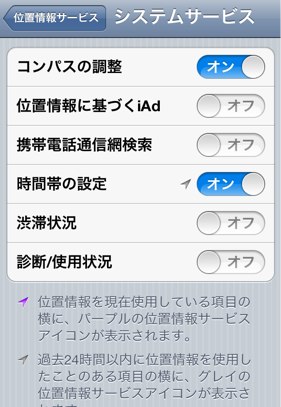
「位置情報に基づくiAd」 とか 「渋滞情報」とか知らないところで位置情報がオンになってんだって思いましたね。
で効果ですが、まだ未知数です。
若干 減りが伸びたようにも思いますが、
まだ 検証が必要です。
11月10日追記
設定してから 1週間程経過してみての使用感ですが、
確かに設定する前に比べて私の場合 電池の持ちが明らかに長くなりました。
今までは 毎日 家に帰ったらすぐ充電し、翌日の朝 もって会社に出勤 という状態だったのですが、
同じぐらいの使用時間で、帰っても充電しなくていいか っていう状態です。
感覚では 1.5倍ぐらいになった感覚です。
登録:
投稿 (Atom)